
Guide
Laser kerf and slot width: what size to draw a slot
Draw slots one kerf narrower than the measured sheet: slot = thickness − kerf. Table for 3 mm, 1/8 in and 6 mm, and how to test your kerf.
Updated 10 Nov 2026 · By the MocMakes team
Draw a slot narrower than your sheet by one kerf: slot width = measured sheet thickness − kerf, plus about 0.1 mm if the part has to slide. A slot drawn exactly at the sheet thickness cuts one kerf wider than drawn, so with a 0.15 mm kerf a 3.00 mm slot comes out 3.15 mm wide and the joint is 0.15 mm loose. Measure the sheet with calipers and find your kerf with a test cut, because both change from sheet to sheet and laser to laser.
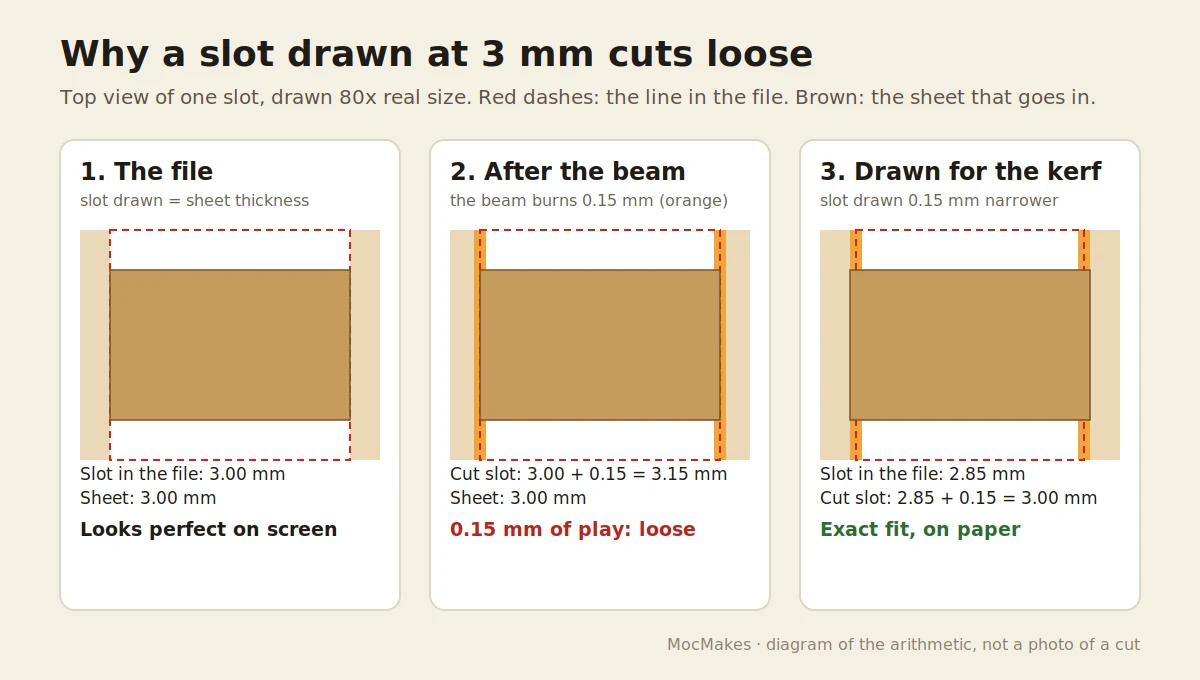
What is kerf in laser cutting?
Kerf is the width of material the laser beam burns away along a cut. The beam is centred on the line in your file, so half the kerf comes off each side of the line. Outside edges therefore cut half a kerf smaller than drawn, and holes and slots cut half a kerf larger on every side, which makes a slot a full kerf wider than drawn.
Kerf is not a fixed property of a laser. It depends on the spot size, the focus, the power and speed, and the material; xTool's guide to kerf gives 0.25 to 0.51 mm for wood and plastics and notes that in thick material the cut is wider at the bottom than at the top. That is why a number from someone else's machine is only a starting guess.
How wide should I draw a slot?
For a slot that a flat sheet pushes into, only the slot is cut: the part that goes in is the sheet's own thickness. So the whole kerf goes into the slot, and the drawn width is the sheet thickness minus the kerf. The table below is that arithmetic for common sheets, for a press fit with no added clearance.
| Sheet thickness (measured) | Kerf 0.10 mm | Kerf 0.20 mm | Kerf 0.30 mm | Kerf 0.40 mm |
|---|---|---|---|---|
| 2.90 mm (0.114 in) | 2.80 mm | 2.70 mm | 2.60 mm | 2.50 mm |
| 3.00 mm (0.118 in) | 2.90 mm | 2.80 mm | 2.70 mm | 2.60 mm |
| 3.175 mm (1/8 in) | 3.075 mm | 2.975 mm | 2.875 mm | 2.775 mm |
| 3.20 mm (0.126 in) | 3.10 mm | 3.00 mm | 2.90 mm | 2.80 mm |
| 3.30 mm (0.130 in) | 3.20 mm | 3.10 mm | 3.00 mm | 2.90 mm |
| 6.00 mm (0.236 in) | 5.90 mm | 5.80 mm | 5.70 mm | 5.60 mm |
| 6.35 mm (1/4 in) | 6.25 mm | 6.15 mm | 6.05 mm | 5.95 mm |
Then add clearance where the joint needs it:
- Fixed joints (walls, stands, slot-together houses): no clearance. A tight joint can be sanded; a loose one needs glue.
- Parts that slide or cross (cross-lap dividers, removable inserts): add about 0.10 mm. That is what our own cross-lap files use.
- Sliding lids in a groove: add about 0.30 mm, the play our box files draw into lid grooves.
Finger joints are different: both parts are cut, so the fingers lose a kerf in width and the notches they go into gain one. The play across each finger is about twice the kerf, which is why box joints drawn with no allowance can rattle. Box generators usually have a kerf or burn setting for this; apply the kerf to the whole outline rather than to the slots alone.
Why don't 3 mm files fit my 1/8 inch plywood?
Because they are not the same thickness. 1/8 in is 3.175 mm, about 6% thicker than 3 mm, and real sheets drift from both numbers. A slot drawn at 3.00 mm cuts 3.00 mm plus your kerf: with a 0.10 mm kerf that is 3.10 mm, too tight for a 3.175 mm sheet; with a 0.20 mm kerf it is 3.20 mm, just enough. A file drawn for 1/8 in sheet, cut in 3 mm plywood, rattles. On the Glowforge community forum, a buyer whose tab-and-slot files would not fit solved it the way we recommend: they changed only the slot widths in Inkscape, not the size of the whole design.
How do I find my kerf and the right slot width?
- Measure the sheet with calipers in three or four places, away from the edges. Use the average, and the largest value if they differ by more than 0.1 mm.
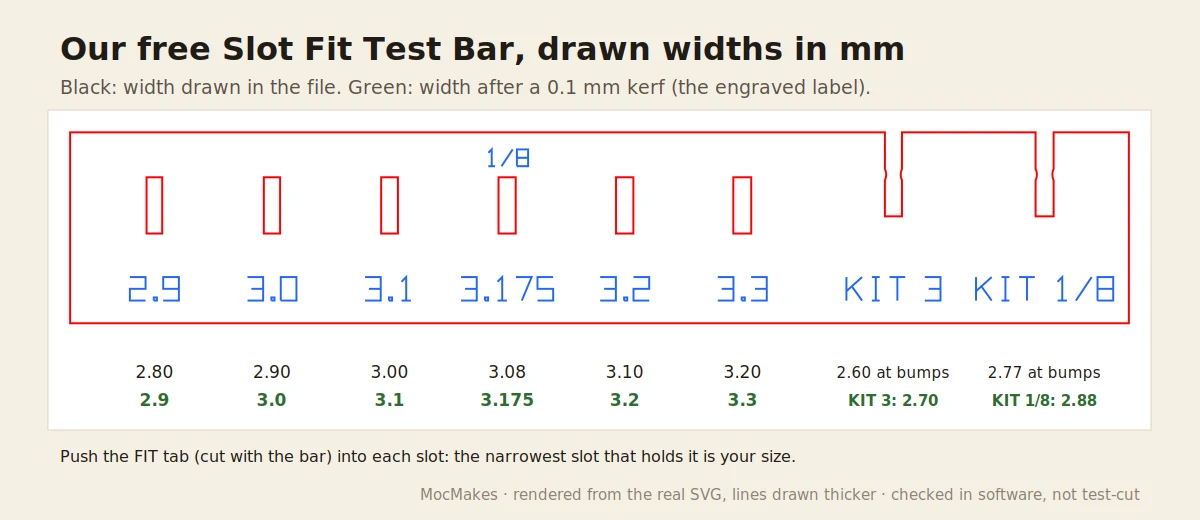
- Cut a fit test from the same sheet with the settings you will use for the project. Our free Slot Fit Test Bar has six slots and a FIT tab; LightBurn's kerf test uses a Vernier scale instead and gives you a Kerf Offset number directly.
- Push the tab into each slot. The narrowest slot that takes it with firm finger pressure, no mallet, and holds the bar when you lift it by the tab is your size.
- Draw your slots at that slot's drawn width. On our test bar every slot is drawn 0.10 mm narrower than its engraved label, so drawn width = label − 0.10 mm. This works whatever your kerf is, because the test was cut on your laser and your sheet.
Should I fix slots in the file or with a kerf offset in the laser software?
Both work; they do different things.
- Narrower slots in the file change only the joints. Outlines stay the size the designer drew, and the file works on any laser with a similar kerf. This is what a file drawn at nominal thickness, like most of ours, needs.
- Kerf offset in the laser software moves every cut path: outlines out, holes in. LightBurn's Kerf Offset sits in the cut settings for Line layers, works only on closed shapes, and moves positive values to the outside of shapes; in xTool's software a positive value also moves the beam outward. The offset is applied per side, so it is normally about half your kerf: xTool's help page says the compensation is half the laser spot width. Check your program's help before entering a number.
- Never do both on the same file: you would take the kerf off twice and the joint would jam.
How are our own slot files drawn?
We measured the cut layers of every slot-together file set we make in both a 3 mm and a 3.2 mm version (lanterns, houses, boxes, stands, dividers). This is what the files contain:
| Joint type | Drawn width in the 3 mm set | Drawn width in the 3.2 mm set | Allowance |
|---|---|---|---|
| Fixed slots, tabs and fingers (all flat sets) | 3.00 mm | 3.20 mm | none: drawn at nominal thickness, no kerf compensation |
| Cross-lap notches (dividers, 3D stars, ornament tree) | 3.10 mm | 3.30 mm | +0.10 mm clearance |
| Sliding-lid grooves (boxes) | 3.30 mm | 3.50 mm | +0.30 mm clearance |
| One 3D lantern kit | 2.99 mm | 3.19 mm | kerf-compensated for a 0.15 mm beam |
We draw most joints at nominal size on purpose: with no kerf taken off, a sheet up to about one kerf thicker than nominal still goes in, and a slightly loose joint can be glued. If your sheet measures exactly nominal and you want a press fit, narrow the slots by your kerf as above. "3.2 mm" in our files means 3.20 mm, not 1/8 in. None of these sets has been test-cut by us; the numbers are what the files contain.
Can a tool resize the slots for my sheet?
Our free Slot Fit Adjuster reads an SVG or DXF, finds the slots, notches and finger joints, and redraws only those for your measured thickness and kerf. On its sample box, 3.00 mm slots for 3.20 mm plywood with a 0.10 mm kerf are redrawn at 3.10 mm, the same arithmetic as the table above. It runs in your browser, and it can also make a small test strip from your own file to cut first. To check the rest of the file, use the free Laser SVG Checker.
Questions
What is a typical laser kerf?
There is no single number. It is a fraction of a millimetre; xTool's guide quotes 0.25 to 0.51 mm for wood and plastics, and our test bar is labelled for 0.10 mm. Focus, power, speed and thickness all change it, so measure yours with a test cut on the sheet you will use.
Does kerf make parts smaller?
Yes. Outside edges lose half a kerf each, so a 50 mm square cut with a 0.2 mm kerf comes out about 49.8 mm. Holes grow by the same amount. That is enough to loosen slots and finger joints, and rarely matters for decorative pieces.
Should I scale a 3 mm file up to fit 1/8 inch plywood?
It can work, but it is a blunt fix. Scaling by 105.8% widens 3.00 mm slots to 3.175 mm, and it also makes every piece and every hole 5.8% bigger, including holes sized for a tea light or hardware. It does nothing for your kerf either. Changing only the slot widths is cleaner.
Sources
- LightBurn documentation, Line mode cut settings: Kerf Offset, and Testing Kerf Offset.
- xTool Support, How to set kerf offset.
- xTool, What is laser cutting kerf? (typical widths and what changes them).
- Glowforge Community, 3 mm vs 1/8 in material.