
Guide
SVG, DXF or PDF for laser cutting: which file to use
Export SVG in mm for most laser software. DXF keeps units and layers but drops fills; PDF keeps the drawing. Measured on one design in all three.
Updated 10 Nov 2026 · By the MocMakes team
For most hobby laser software, export an SVG sized in millimetres: it keeps your colours, which the software turns into cut, score and engrave layers, keeps filled shapes for engraving, and carries the page size. Use DXF when the drawing comes from CAD or your software reads nothing else: it keeps units and layers but turns fills into bare outlines. PDF carries the same drawing as the SVG and works in LightBurn and Glowforge, but not every program opens it. PNG and JPG can only be engraved.
We opened the SVG, DXF and PDF of one of our own designs side by side to show exactly what each format keeps.
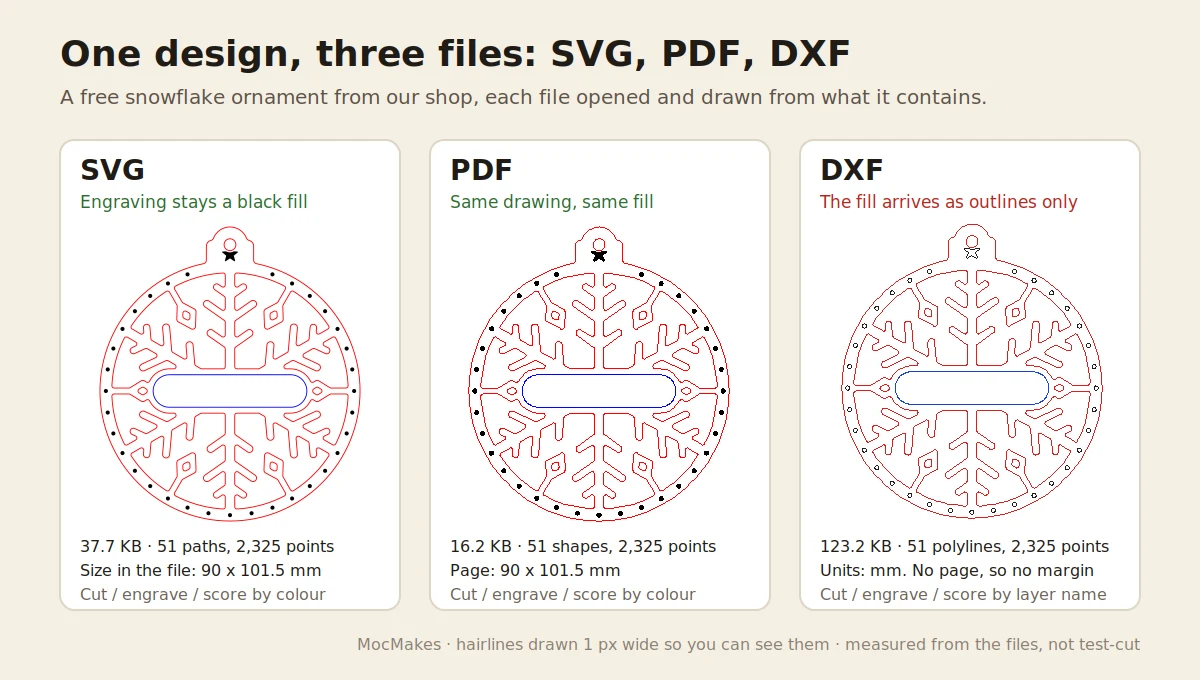
What does each format keep?
These numbers come from opening the three files of our free snowflake ornament (a cut outline, engraved dots and star, and a scored name band) and reading what is inside each one.
| SVG | DXF | ||
|---|---|---|---|
| Real size | Yes: 90 × 101.5 mm in the file | Yes: page 90 × 101.5 mm | Yes: units set to millimetres; drawing 88.0 × 99.5 mm |
| Page or margin | Yes (1 mm around the piece) | Yes | No: a DXF has only the drawing, no page |
| How cut / score / engrave are marked | Colour: red, blue, black | Colour: red, blue, black | Layer names: CUT, SCORE, ENGRAVE |
| Engraving as a filled shape | Yes: black fill | Yes: black fill | No: 34 closed outlines on the ENGRAVE layer |
| Shapes and points | 51 paths, 2,325 points | 51 shapes, 2,325 points | 51 polylines, 2,325 points |
| Pictures or text inside | None | None | None |
| File size | 37.7 KB | 16.2 KB | 123.2 KB |
The other designs we checked (a gingerbread man, an engrave test card, a name ornament and a slot test bar) gave the same picture: every DXF was in millimetres and held outlines only, and wherever there was a PDF, its page matched the SVG's size exactly. Our own exporter writes curves as many short straight segments in all three formats, which is why the point counts match exactly. Files from design programs may differ. SVG, AI and PDF store curves the same way LightBurn does internally, while CAD-style DXF curves have to be converted, usually into many short lines; that is the reason given on the LightBurn forum for preferring SVG, AI or PDF for artwork.
Which formats does my laser software open?
| Software | Cuts from | Engraves pictures from | Notes from the maker's help pages |
|---|---|---|---|
| LightBurn | AI, SVG, DXF, PDF, PLT/HPGL | PNG, JPG, BMP, GIF, TIFF | Text in imported files must use installed fonts or be converted to paths. |
| Glowforge app | SVG, PDF (DXF for Premium members) | JPG, PNG | JPG and PNG are "for engraving only". |
| xTool Creative Space (XCS) | SVG, DXF | PNG, JPG, BMP | PDF is not on the import list; text inside an SVG is not shown, so convert it to paths. |
Lists checked on 10 Nov 2026; programs add formats over time, so check the linked pages if you are on a newer version.
When should I use SVG, DXF or PDF?
- SVG for almost everything you design yourself or sell: it opens in all three programs above, keeps colour layers and fills, and is the format our Laser SVG Checker reads. Make sure the size is in mm or inches, not pixels, or it can import at the wrong size (see SVG imports at the wrong size).
- DXF for parts drawn in CAD (Fusion, FreeCAD, SolidWorks), for laser software that only takes DXF, and for metal or outsourced cutting services. After import, set the ENGRAVE layer to fill in your laser software, because the DXF only carries outlines. DXF can store fills as hatch entities, but ours hold outlines only, so check yours after import.
- PDF as a second copy for LightBurn and Glowforge users, and for printing a paper template at 100%. A PDF can hold a scanned picture instead of lines: if your laser software shows it as one image, it will engrave, not cut.
- PNG or JPG only for photo engraving. To cut a picture, trace it first (see how to convert an image to SVG).
What file should I export for laser cutting?
- Set the document or artboard size in millimetres (or inches) at the real size of the piece.
- Convert all text to paths or outlines.
- Give cut lines a stroke in one colour, for example red, with no fill. Use other colours for score and engrave, and black fill for areas to engrave.
- Delete hidden objects, guides and embedded pictures you do not want engraved.
- Export SVG. In Inkscape use Save As > Plain SVG. Add a DXF if you sell the file or your buyer's software needs it, and a PDF if you want the widest coverage.
- Run the SVG through a checker and cut a small test piece before the full sheet.
If you sell files, ship all three. Our free packs carry SVG, DXF and PDF of every design for exactly the reasons in the table: each buyer's software opens at least one of them.
Questions
Is DXF better than SVG for laser cutting?
Not for most hobby lasers. Both carry the same lines, but SVG also keeps fills and colours and opens in LightBurn, Glowforge and xTool's software alike. DXF is the better choice when the part comes from CAD or the machine's software only reads DXF.
Can a laser cut a PDF?
Yes, if the PDF contains vector lines. Our ornament PDF holds 51 vector shapes and no pictures, so LightBurn and Glowforge can cut it. A PDF made by scanning or from a photo holds a picture, which can only be engraved.
Why did my DXF engrave nothing?
Usually the engraving arrived as closed outlines with no fill, as in our own DXF files, and its layer is set to line mode, so the laser traces the outlines instead of filling them. Set that layer to fill mode in your laser software before running the job.
How we measured
We read the snowflake ornament's three files from our free laser files with standard open-source libraries: the SVG as XML, the DXF with ezdxf (units from its $INSUNITS header, entities and layers from the model space) and the PDF with PyMuPDF (page size and vector drawings). We repeated the checks on the gingerbread man, the engrave test card, a name ornament and the slot test bar. Nothing here was test-cut.
Sources
- LightBurn documentation, File management: supported formats.
- Glowforge Support, Upload your own design file.
- xTool Support, FAQs on importing images (XCS import formats and SVG text).
- LightBurn Forum, SVG or DXF file, which one?